Connect Link2AI. Then just paste links.
Link2AI is available in Claude's Connectors Directory. Connect it once, sign in to your Link2AI account, then let Claude use it when your question depends on a supported public link.
Install from Claude's Connectors Directory.
Use the official directory path. You do not need to add a custom MCP URL, client ID, or client secret.
Find Link2AI in the directory.
Open Claude's Connectors Directory, search for Link2AI, and press Connect.
Use the published connectorSearch “Link2AI”
Choose the published Link2AI connector by Eason Systems, then Connect.
Sign in once
Your trial, usage and plan stay attached to the same account.
Sign in to Link2AI.
Claude will open Link2AI authorization. Sign in or create your Link2AI account, then approve the connection.
Trial: 10 processing units. No card required. Failed / unsupported / inaccessible reads cost 0 units.
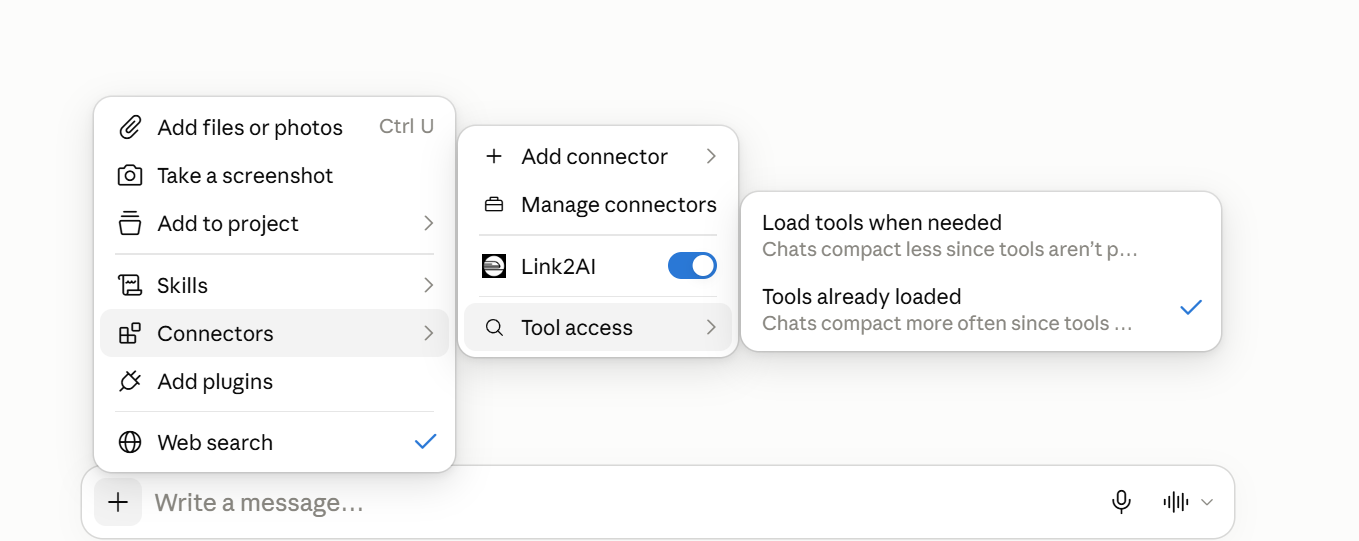
For maximum reliability, use “Always available”.
Claude's Tool access has Auto, Always available, and On demand. If you want Link2AI ready every time, choose + → Connectors → Tool access → Always available for that conversation.
Auto is Claude's default and may decide not to load a connector. “Always available” is the reliable choice when you expect Link2AI to work every time.
Per conversation in Claude